





AI-Powered Supplier Risk Management
Stop reacting to risk.
Start getting ahead of it.
Automate insurance verification and the compliance tasks that weigh your team down — then get risk insights, benchmarks, and guidance to proactively lead your risk program.
Trusted by teams with complex supplier networks.
Protect your taxpayers
Public Sector
Reduce administrative workload and keep vendor compliance moving across complex public programs.
Explore Public Sector





Turn risk into revenue
Equipment Rental
Sell more waivers when you automate your insurance verification and make renting easier for customers.
Explore Equipment Rental



ENTERPRISE SCALE
Best practices at world-class organizations
Bring insurance, contract, and supplier risk workflows together across large, distributed organizations—whatever the industry.







The job is getting harder.
The stakes are getting higher.
More Suppliers, More Complexity.
Every new supplier is another variable your risk program has to handle — and the more complex your network gets, the more places compliance gaps can hide.
Tiny Gaps, Huge Exposure.
One wrong endorsement. One lapsed renewal. One insufficient requirement. That's all it takes to leave you holding the bag on a claim you thought you were protected against.
Coverage Changes When You're Not Looking.
Cancellations, expirations, and fraud are more common than ever — and coverage that was valid when you verified it may not be valid when a claim is filed.
Know your vendor risk before the first compliance doc lands.
Waiting for paperwork to arrive isn't risk management. It's risk reaction. Name a supplier or upload a contract — and get an instant snapshot with signals to act on.
Select vendors with confidence — compliance track record, known problem flags, cancellations, and fraud signals
Set the right requirements — expected coverage ranges and scope risks to guide what to ask for, and exclusions to watch
Assess exceptions with context — benchmarks and exposure signals that give you a fuller picture before you approve
Prioritize your focus — who to fast-track, who to slow down, and who to engage before issues surface
For any vendors already in the Evident Network — chances are, half of yours are — the picture gets even clearer: anticipate their compliance against your requirements before you've collected a thing.
Fix bottlenecks with Fast & Flexible insurance verification
Collect Docs Without Back-and-Forth
Automated outreach, reminders, and doc collection — so your team stops chasing vendors.
Verify Every Critical Detail
Every coverage type, limit, endorsement, and exclusion — reviewed against your exact requirements.
Monitor 24/7
Automatic alerts on cancellations, lapses, and any expirations and exceptions you should keep an eye on.
Fit the Platform to Your Program — Not the Other Way Around
Start quickly with best-practice automations built in. Then tailor everything — requirements, workflows, emails, permissions, integrations — without IT delays or change orders slowing you down.
Auto-trigger active
Renewal reminder sent
30 days before expiry
30 days before expiry
47 vendors covered
Also verifying
W-9 / Tax Form
Background Check
Business License
Profile saved
Applied to 287 contractors
Origami connected
Auto sync is live
Verify Everything That Matters — Not Just Insurance
Docs
- W-9s
- Hold Harmless Agreements
- Contracts
Credentials
- Licenses
- Permits
- Certifications
Identity
- Business Registration
- Background Checks
- Motor Vehicle Records
Since implementing Evident, we've seen an 85% reduction in administrative burden related to insurance verification.
— Jennifer Davis, CIO & Strategic Initiatives, AgSouth Farm Credit
Get ahead of risk — with big picture visibility
KPIs to keep your program running smoothly
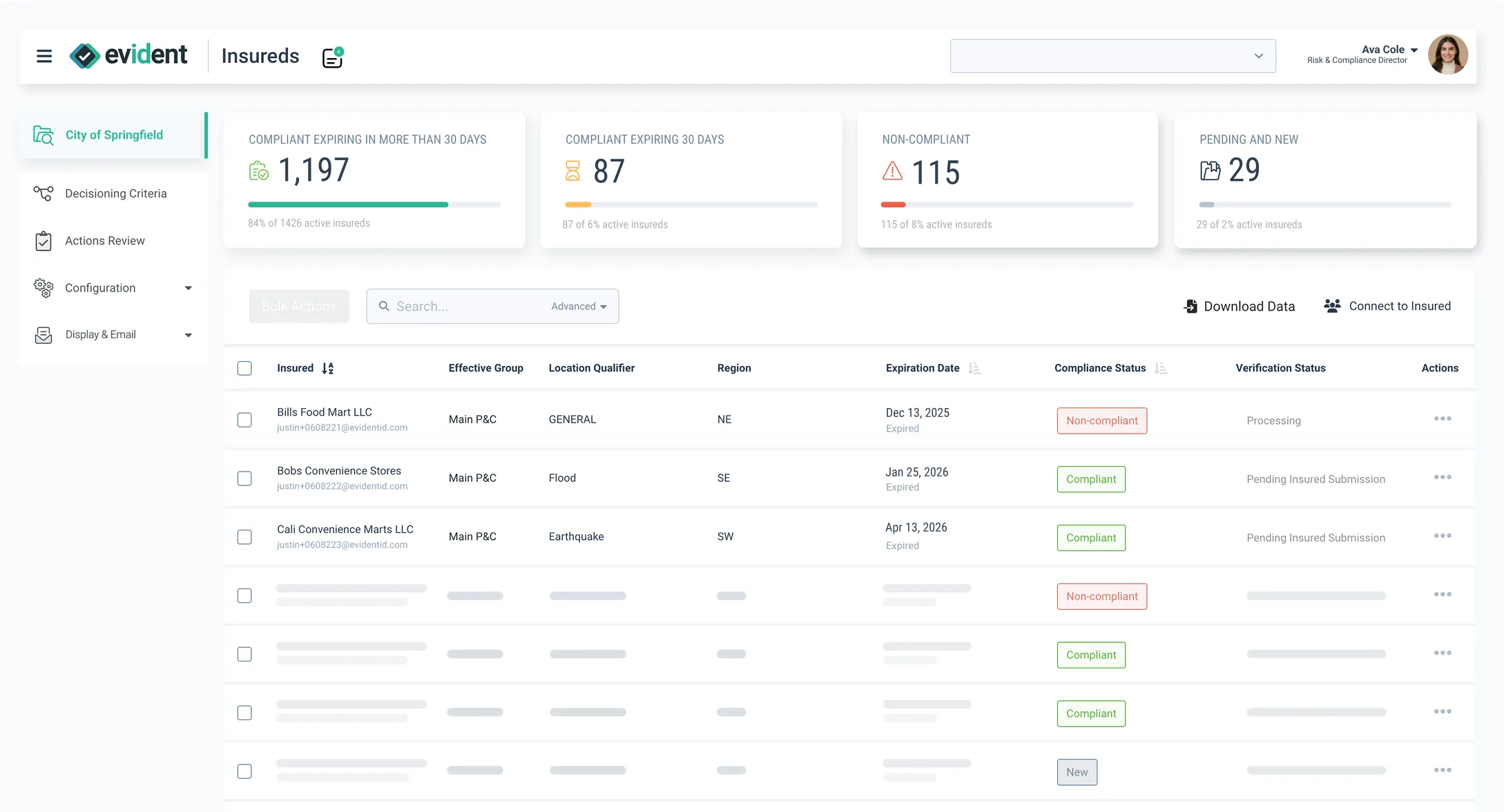
Track what matters at a glance — compliance rates, renewal backlogs, exception trends, and more.
Benchmarks to ensure you're setting the right requirements
See how your standards compare — and know when to raise, adjust, or hold firm.
Spot risk patterns across your entire program
Identify compliant-but-underinsured vendors, yellow-flag categories, risky exception patterns, and exposures worth getting ahead of.
Recommendations to match reqs to the risks that actually matter
Guidance to sharpen what you require — contract by contract, vendor by vendor.
Data to get better rates from underwriters — and buy-in from leadership
Trends, benchmarks, and program health data that tell the story your executives and underwriters need to hear.
Smarter AI, powered by the industry's richest risk data
Most platforms have AI. Few have the data to back it up. That difference shows up every time you spot a hidden risk, benchmark requirements, or verify the tiny little details with huge stakes.
Broker Partners




Industry & Risk Partners





The Evident Network
World's Largest Network of Verified Businesses.
We've verified insurance, registrations, and credentials in 65 languages across 140 countries. We don't just have better benchmarks - we've already verified half your vendors.
Loved by Devs
Webhooks, open APIs, SDKs, sandboxes, file exchange, and native and custom integrations.
Trusted by CISOs
SOC 2 Type II · GDPR & CCPA





Flexible to fit any enterprise, any industry, any complexity
From construction sites to local governments, logistics networks to service providers — Evident adapts to the risk requirements of your enterprise.
Risk Leaders Community
Learn best practices from experienced risk leaders

See what your risk program looks like on Evident.
- Spotting risks faster, even before docs arrive
- Automating compliance tasks that are tedious and error-prone
- Smarter, proactive risk decisions with benchmarks and best practice recs